
Web Worker Best Practices for Web Apps
Web Workers are a feature in modern web browsers that enable JavaScript to run in the background, independently of the main browser thread. For more information, see Using Web Workers.
The execution model is true parallelism rather than concurrency, which manages asynchronous operation on the main thread. Web Workers explicitly prevent UI blocking by offloading the work. Concurrency code doesn't prevent UI blocking if the asynchronous task is computationally heavy. In this way, Web Workers becomes a powerful tool when used correctly.
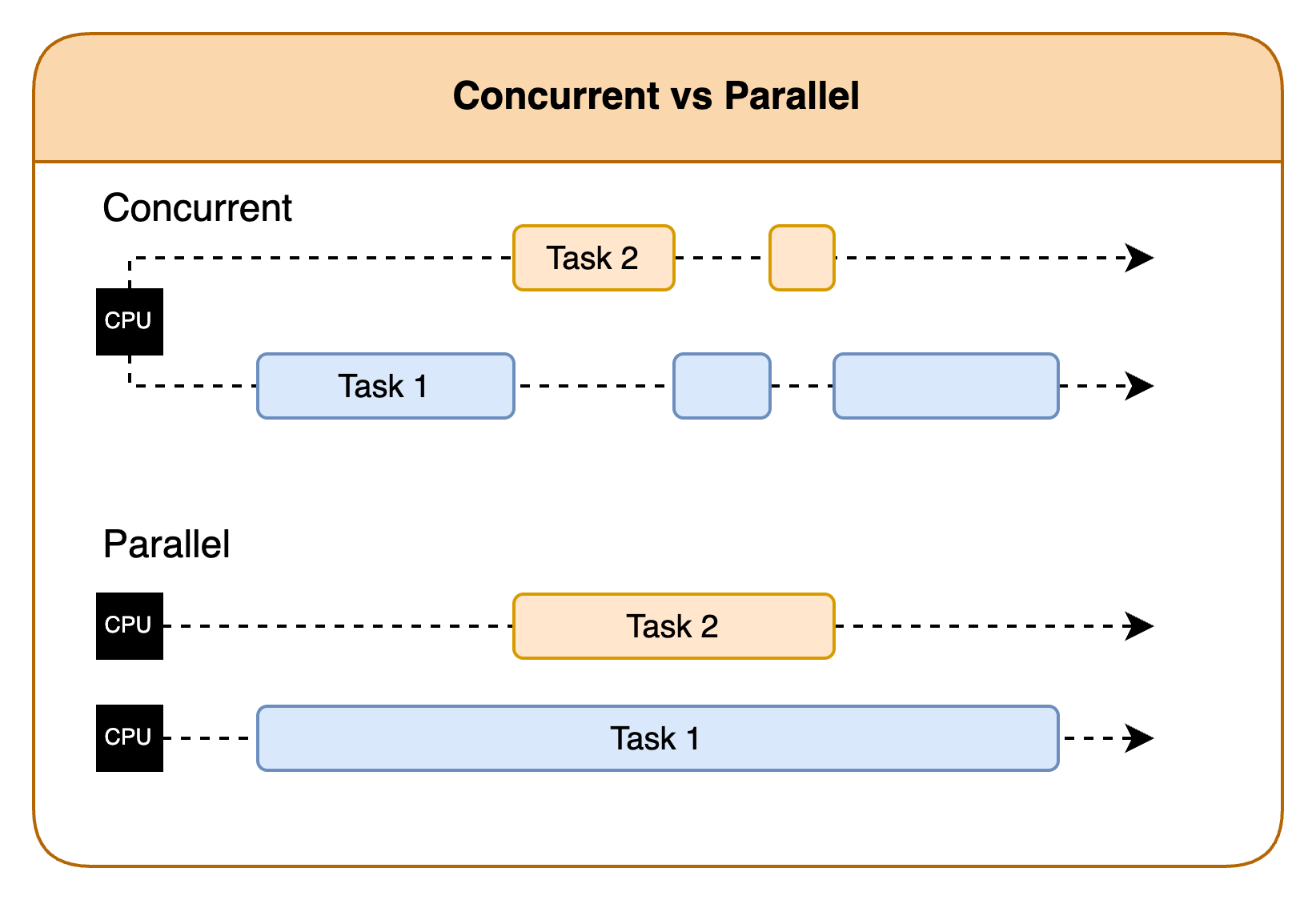
Blink is the rendering engine used by Chromium. It uses a thread pool algorithm built to maximize the performance of a web app. It's more complex than fixed or cached, and it excels at burst calls for small workers. Blink balances parallelism and concurrency across CPU cores to maximize core usage. Chromium manages threads and resources, and includes resource limits and sandboxing. It's the web app's role to determine the appropriate number of Web Workers to create based on the task type, complexity, and available system resources. Manage the communication between the workers and the main thread. The web app must also minimize communication overhead by using strategies like batching, prioritizing, and limiting the number of workers sent at a time.
Web Workers in a Vega WebView
Vega often runs on a device with low resources, so restrict the number of threads to the number of cores on the device. JavaScript provides navigator.hardwareConcurrency to determine how many cores the device contains. The lowest devices have 4 cores while higher-end devices contain more. The algorithm used is number_of_workers = (2 * number_of_cores) + 1. For example, if a device had 4 cores, use a maximum of 9 workers. In some cases, the system can support lower or higher than this depending on worker behavior. The Web Worker lifecycle helps explain some of these cases as well as why resource oversubscription is problematic.
The normal lifecycle of a Web Worker consists of the following:
- The main thread creates a new worker.
- The worker posts a message.
- The worker handles the message.
- The system sends a new message to the main thread.
- The main thread handles the returning message. Communication with the main thread impacts main thread performance. Many small workers that finish around the same time, and send data back to the main thread, would impact the main thread. This impact occurs even if the responses are handled concurrently.
The following are some strategies to maximize performance for Web Workers.
Web Worker guidelines for Vega
- Use Web Workers for genuinely beneficial tasks and be mindful of what events trigger them. Too many Web Workers can overwhelm low-resource devices such as the Fire TV Stick 4K Select.
- Reduce the amount of data passed between workers and the main thread.
- Use transferable objects to avoid copying large amounts of data.
// Use transferable objects to avoid copying large amounts of data
const data = new Uint8Array(1024 * 1024); // 1MB of data
worker.postMessage(data, [data.buffer]); // Transfer the underlying ArrayBuffer
- Use transferable objects to avoid copying large amounts of data.
- Manage your workers and know when they're no longer needed. Use
terminateto remove unneeded workers so they don't all finish and flood the main thread.// Terminate a worker when it's no longer needed worker.terminate(); - Reuse workers or worker pools when possible, instead of spawning new workers.
const worker = new Worker('worker.js'); worker.postMessage('Hello from main thread'); // ... some time later ... // Reusing a worker by posting new tasks to it worker.postMessage('New task'); - Use caching to reduce recalculations.
// Use a Map for efficient ID-based lookups const cache = new Map<string, CachedData>(); self.onmessage = async (event: MessageEvent) => { const { type, payload } = event.data; const { id, forceRefresh } = payload; // Check if the data is already in cache if (cache.has(id) && !forceRefresh) { self.postMessage({ type: 'DATA_RESPONSE', payload: cache.get(id).data }); return; } // ... - Know how many Web Workers run well on a given number of cores. Here are some guidelines for running a quad-core CPU:
- Quad-core can run 1–9 simple workers well
- Quad-core can run 9–15 workers with some impact to the UI
- Quad-core can run 15–30 workers with a visible impact
- Quad-core can run over 30 workers with difficulty
- Here's an algorithm you can use for how many workers to use:
- Always safe:
number_of_workers = navigator.hardwareConcurrency - 2. - Mostly safe:
number_of_workers = (2 * navigator.hardwareConcurrency) + 1.
- Always safe:
- For persistent or heavy workers, consider 2-4 workers simultaneously.
- If you have a CPU intensive task, make sure there aren't many workers running at the same time that could cause issues. You could manage the processing manually to prevent overloading the system.
- Set your headers up so they don't redownload the same files. Some libraries use workers to cache images or other content, and many use a predefined strategy paradigm.
- TV apps often trigger workers on navigation when the image doesn't exist to preload information for higher fluidity. If these images aren't cached, quick navigation often causes workers to flood the system, causing stuttering or freezing. Make sure to set your headers up properly to cache images appropriately.
- There are several strategies for caching. Many of these libraries use "cache only," "cache first," "network only," "network first," or "stale-while-revalidate." Some libraries may use other options such as using the expiry.
Related topics
- Overview of Vega Web Apps
- Performance Best Practices for Web Apps
- Development Best Practices for Web Apps
- WebGL Best Practices for Web Apps
Last updated: Apr 24, 2026
