
Prepare App Testers
With Live App Testing (LAT), app testers can download your test app on their devices and perform user tests.
Testers receive notifications to perform app testing through an email invitation and a push notification to their device. If you have more than one active live app test for an individual app, you will receive notifications for each test separately. The following sections explain how your app testers can enable notifications to test your app, how they can download the app, and how they can install the app.
Discover and manage tests with Appstore Beta Hub
For testers on supported Fire TV devices, Appstore Beta Hub is the recommended way to discover and manage LAT apps directly on the device. It's a self-service app that consolidates a tester's beta apps in one place, so they don't have to rely on locating email or push invitations. From Appstore Beta Hub, your testers can do the following:
- Discover and redeem LAT invitations
- Install and launch test apps
- Check for and install updates to test apps
- Reset in-app purchases without accessing the Developer Console
- Switch between multiple LAT tracks of the same app
Appstore Beta Hub is available in the Amazon Appstore and supports Fire TV devices running Vega OS, or Fire OS 7 and later. Have your testers search for "Appstore Beta Hub" in the Amazon Appstore to install it. For the complete tester walkthrough, share the Appstore Beta Hub guide.
Opt in a tester for LAT emails
When a tester first receives their email invitation, they have an option to unsubscribe from LAT communications. A tester who unsubscribes doesn't receive LAT invites through emails or push notifications. If after unsubscribing, a tester decides they would like to continue receiving LAT invitations, you can share the opt-in link with them. The opt-in link takes them to a web page where they can resubscribe to LAT emails.
To get the opt-in link to resubscribe a tester to LAT emails
- Go to the Developer Console Dashboard, sign in to your account, and then select Tools & Services > Tester Management.
- Select View all testers and then click Copy opt-in link.

Test an app from an email invitation
When you add testers to a live app test, your testers receive an email invitation that contains a link to your app's test page with instructions on how to download and install your app on Fire devices. If you have more than one active LAT test for the app, your testers receive separate email invitations for each test, which contains a link to the test page for that specific version.
You can invite the same tester for more than one LAT test. In this case, if the tester wants to use the same device to test multiple LAT apps, they must first uninstall the LAT app they are currently testing before installing the app from another LAT test.
Have your testers complete the following steps to download your app to begin testing.
To test your app from an email notification
-
The LAT invitation email lists the available marketplaces under "How to Participate". Click the link for the marketplace that you will test.
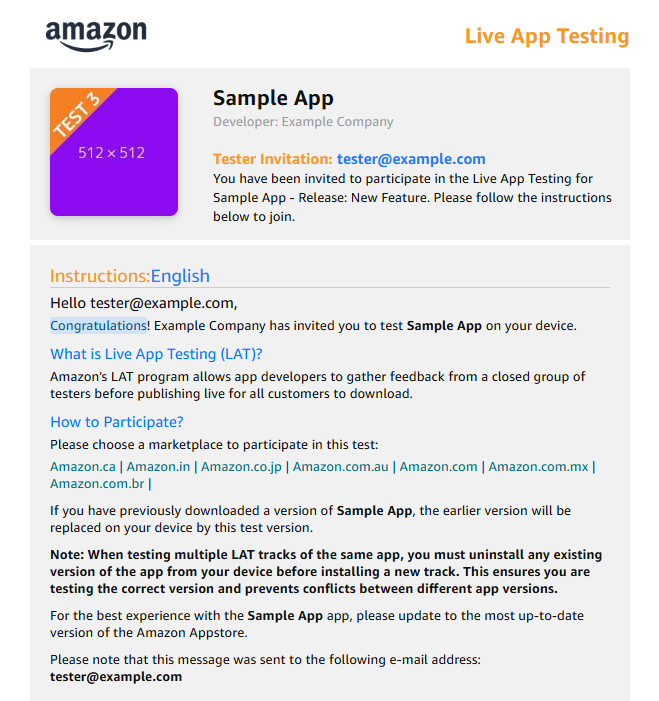
LAT invitation email The link opens the Amazon Appstore retail page for the app in the specified marketplace.
On the app's web page, if you have signed in to the Amazon Appstore on a supported device, you will see a Get App button with a list of compatible devices.
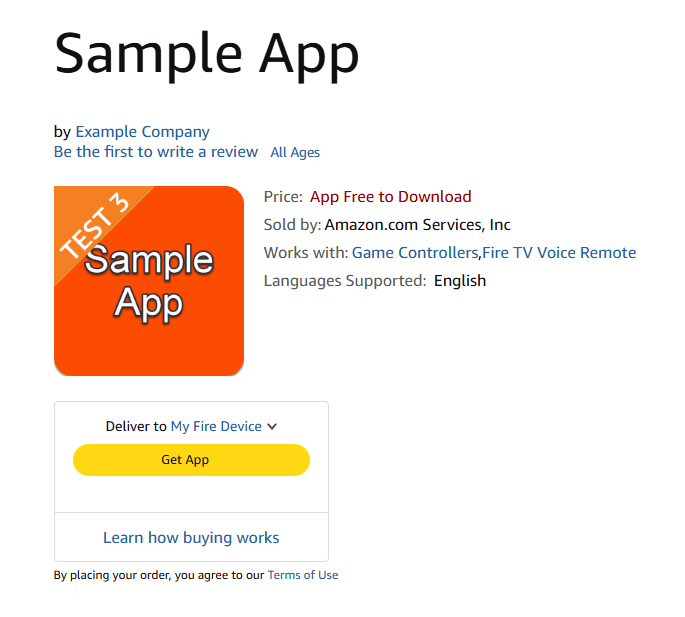
App retail page -
Click Get App.
You're provided with instructions on how to install the app. You can test on as many devices as you have associated with your Amazon account that your app targets.
Test an app from a push notification
In addition to the email notification, testers can receive a push notification on their Fire tablet and Fire TV devices. Testers are eligible to receive push notifications for LAT if the device is registered to the account used for LAT test email notifications.
When you receive a push notification, tap or select the notification on the device. Testers are directed to the app's test page on the Amazon Appstore, where they can download the app and perform user tests.
Related topics
Last updated: Sep 28, 2026
